2-Way Chat in ATAK
Overview
Covers sending and receiving messages through the Somewear ATAK plug-in's Messages feature — a way to reach other Somewear plug-in users over satellite, cellular, or Wi-Fi directly from ATAK, without needing a separate device or app.
Prerequisites
- The Somewear ATAK plug-in installed and a Hotspot paired. See Plugin Configuration in ATAK.
Steps
Send a group message
- Navigate to the Somewear plug-in's main screen.
- Tap the Messages feature.
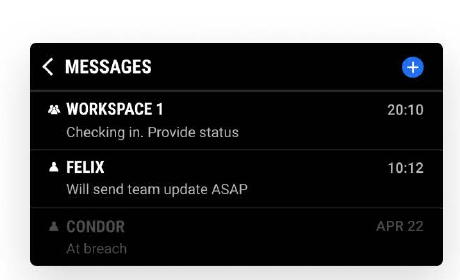
- Tap your team's chat room, indicated by the group icon.
- Type and send your message — it goes to everyone in that Somewear group/team.
Send an individual message
- Navigate to the Somewear plug-in's main screen.
- Tap Messages.
- Tap + in the top right corner.
- Select the person you want to message from the list of callsigns or star numbers.
Check message status
Once a message sends, you'll see a Sent confirmation next to it. If a satellite icon appears next to a message, it was sent or received over satellite; if it's absent, the message went over Wi-Fi or cellular instead.
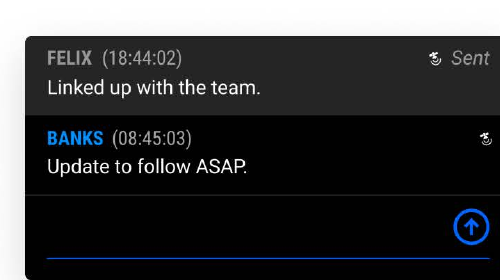
Somewear's Smart Routing handles this automatically — if cellular or Wi-Fi is available it's used first, and the plug-in falls back to satellite only when neither is available.
Only messages sent within the Somewear plug-in can be sent over satellite. Actions taken elsewhere in ATAK are not routed through Somewear.
Troubleshooting
- Message won't send: check that your Hotspot is still paired (status pill expanded) — messaging requires an active connection, same as tracking.
- Not sure if a message went over satellite: look for the satellite icon next to the message; its absence means it went over Wi-Fi/cellular instead, which is expected behavior, not an error.
- Can't find a contact to message: individual messages are addressed by callsign or star number from your Somewear contact list — confirm the person is in your workspace first (see Assigning Node to Group).